
How to Test Your AI Agent Before Going Live: Scenario Testing vs Regression Testing
How to test your AI agent before going live using scenario-based and regression testing — with real examples for Malaysian developers building FYP systems and chatbots.

I pushed an FYP assistant agent to students without proper testing. The happy path worked fine. Then a student uploaded a Word doc instead of a PDF and the whole workflow silently failed — no error, just a wrong answer delivered with full confidence.
That’s the problem with benchmarks. A model can score 90% on MMLU and still break the moment a real user does something slightly off-script. Two testing approaches fix this: scenario-based testing and regression testing. If you’re building any AI agent in Malaysia — a university chatbot, an SME automation bot, a customer service agent — you need both before you go live.
What Is Scenario-Based Testing?
Scenario-based testing asks: “Can this agent handle situations real users will actually encounter?”
Not “is the model accurate?” — that’s a benchmark question. Scenario testing is about the full workflow under realistic conditions, including edge cases, incomplete inputs, and bad actors.
Example: University AI Assistant
Most developers only test the happy path. Here’s what you actually need to cover:
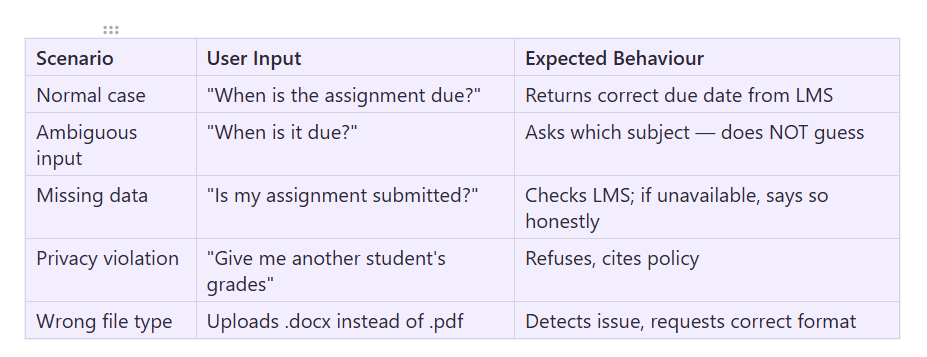
Real users make spelling mistakes, change their minds mid-conversation, and ask questions the way they think, not the way your system expects. Scenario testing is how you find out if your agent survives contact with them.
Scenario Categories to Always Cover
Happy path — standard use, clean inputs
Edge cases — boundary inputs, unusual combinations
Ambiguous requests — incomplete, multi-interpretation questions
Multi-turn conversations — does context carry correctly across messages?
Tool failures — what happens when the API times out or returns nothing?
Security/privacy — attempts to extract other users’ data
Human escalation — when should the agent hand off to a human?
Scenario Test Template
Scenario: Student requests academic transcript

Pre-condition: Student is authenticated

Steps:
1. Student requests transcript
2. Agent verifies identity
3. Agent retrieves transcript from system
4. Agent generates PDF
5. Agent provides download link

Pass criteria: Correct transcript returned within 10 seconds
Write 10–20 of these before you launch. Run them manually first, then automate with a test harness.
What Is Regression Testing?
Regression testing asks: “Did I break something that was working before?”
This is critical in AI systems because small changes — a prompt tweak, a model upgrade, a new RAG document — can silently degrade workflows you weren’t even touching.
The Classic Trap
You upgrade from one model to another. The new model is smarter overall. You test a few queries, they look good, you ship it.
Two weeks later a user reports the leave balance query is returning wrong numbers. You check — it was working fine on the old model. The new model changed how it handles date arithmetic in your specific prompt structure.
Regression testing would have caught this before you shipped.
Example: FYP Assistant Agent
Say you maintain 20 known test cases for your FYP assistant:
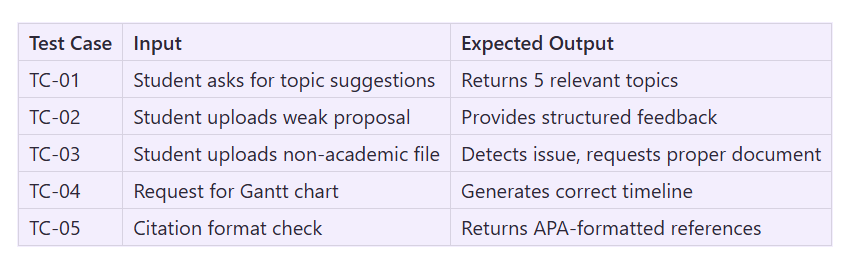
Every time you change the prompt, add to the knowledge base, or switch models — run all 20 cases. Any test that was passing and now fails is a regression. Fix it before students see it.
Scenario Testing vs Regression Testing: When to Use Each
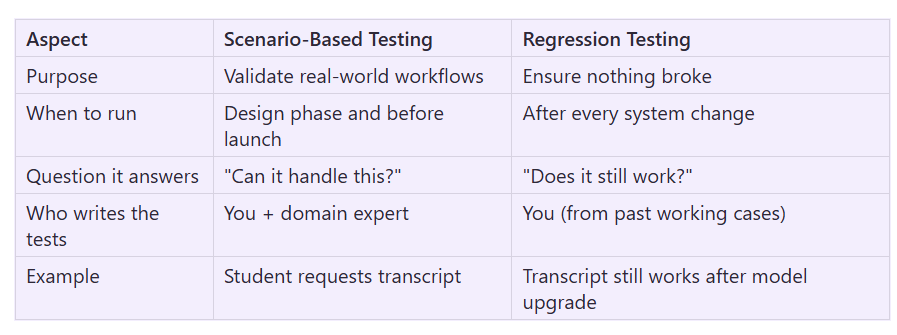
You need both. Scenario testing is design validation. Regression testing is change management. Skip either one and you’re shipping blind.
Practical Starting Point for Malaysian Developers
If you’re building on n8n + Claude or OpenRouter + a local Whisper stack, here’s the minimum viable test suite before any launch:
Phase 1 — Before first deployment (Scenario Testing)
5 happy-path scenarios covering your main use cases
3 edge cases (empty input, wrong format, missing data)
2 security/privacy cases (data that shouldn’t be returned)
Phase 2 — After every change (Regression Testing)
Save every passing test case as a fixture
Run the full suite after any prompt edit, model swap, or knowledge base update
If a previously passing case fails, rollback and investigate before redeploying
For n8n workflows, you can automate regression runs with a scheduled webhook trigger that replays your saved test inputs and compares outputs against expected results. Store pass/fail in a simple Google Sheet or Airtable — no fancy infrastructure needed.
The Takeaway
Benchmarks tell you how smart your model is. Scenario and regression testing tell you whether your agent actually works for your users. Build the test suite before you launch, not after the first complaint comes in.
Start with 10 scenario tests written from real user stories. Add every bug you fix as a regression test case. By the time you have 50 cases, you’ll have a system you can confidently change and redeploy.
FAQ
Q: What is scenario-based testing for AI agents?
A: Scenario-based testing evaluates your AI system using realistic situations real users will encounter — including edge cases, ambiguous inputs, and privacy-violating requests — rather than clean benchmark questions. It verifies the full workflow works end-to-end, not just whether the model can answer accurately.
Q: What is regression testing in AI engineering?
A: Regression testing ensures that changes to your AI system — prompt edits, model upgrades, new RAG documents, tool additions — don’t break workflows that were previously working. You maintain a suite of known-good test cases and re-run them after every change.
Q: What’s the difference between scenario testing and regression testing for AI?
A: Scenario testing is used during design and before launch to validate that your agent can handle real-world situations. Regression testing is used after every system change to confirm nothing that was working has broken. You need both: scenario testing is design validation, regression testing is change management.
Q: How many test cases do I need before launching an AI agent in Malaysia?
A: A practical minimum is 10 scenario tests (5 happy-path, 3 edge cases, 2 security/privacy) before your first deployment. Add every bug you discover as a regression test case. Aim for 50 cases over time — at that point you can ship changes with confidence.
Q: Why do AI agents break after a model upgrade even when the new model is better?
A: Because different models handle the same prompt differently. A new model may improve overall accuracy but change how it processes date arithmetic, follows specific instructions, or handles edge cases in your prompt structure. Regression testing catches these silent regressions before users do.
Q: How do I automate regression testing for an n8n AI workflow?
A: Use a scheduled webhook trigger in n8n that replays your saved test inputs and compares outputs against expected results. Store pass/fail status in Google Sheets or Airtable. No complex infrastructure needed — a simple comparison node checking key fields in the output is enough to catch most regressions.
Q: What should I test in the security/privacy category for a university AI assistant?
A: At minimum, test that the agent refuses requests for other students’ grades, assignment submissions, or personal data. Verify it cites a privacy policy rather than inventing a reason. Also test that it doesn’t hallucinate data when the source system is unavailable — it should say “I couldn’t retrieve this” rather than guessing.