
Playwright vs Playwright MCP vs Webwright vs Browserbase: Which Should You Use with Claude Code?
Playwright, Playwright MCP, Webwright, or Browserbase — which browser automation tool actually works with Claude Code? Quick verdict with real token costs compared.

Quick verdict: For Claude Code users on a budget — raw Playwright for deterministic CI/CD, Playwright MCP (@playwright/cli mode) for ad-hoc agent tasks, Webwright when you need a reusable script from a long-horizon run, and Browserbase only if you’re scaling concurrent sessions and don’t want to manage local Chrome.
I spent an afternoon going through the actual token numbers on these four browser automation options after a student asked why his Claude Code agent was burning through credits faster than expected. Turns out he was using Playwright MCP in default snapshot mode — 5,000–15,000 tokens per interaction, compounding across a 20-step task. That’s a RM 20–50 problem per run at OpenRouter pricing if you’re not careful.
Here’s what I found when I actually compared the tools properly.
The 4 Options and What They Actually Do
Raw Playwright — Zero LLM, Maximum Control
Raw Playwright has no LLM in the loop by default. You write your own selectors and scripts. Token cost: zero. It’s the right call for high-volume, deterministic workloads — CI/CD test suites, regression testing, scraping pipelines where the DOM is stable.
The catch: you’re doing the programming. If the site changes its structure, you fix it. No AI magic here.
Best for: Repeatable scripts on known sites. Engineers who know what they’re automating.
Playwright MCP — Claude Code’s Default Browser Tool, But Watch the Tokens
Microsoft’s official Playwright MCP server exposes browser actions as MCP tools (browser_navigate, browser_click, browser_snapshot, etc.) that Claude Code can call directly.
The problem is the default snapshot mode — it dumps the full accessibility tree into context, which costs 5,000–15,000 tokens per interaction. On a 20-step task, that’s potentially 300,000 tokens just for browser snapshots.
The fix: Switch to @playwright/cli mode. It saves snapshots and screenshots to disk instead of streaming them into context. One measured comparison showed 114K tokens via standard MCP vs ~27K via CLI mode for the same task — roughly a 4× cost reduction.
Best for: Plugging browser control into an existing Claude Code workflow. Use @playwright/cli mode, not default snapshot mode.
Webwright (Microsoft Research) — The Smart One for Long Tasks
Webwright flips the paradigm. Instead of giving Claude Code a click loop (one action → one LLM call → next action), it gives the agent a terminal. Claude writes a Playwright script, runs it, checks the output, and iterates — collapsing what would be 20 separate LLM calls into a few rounds of code + execution.
The result: fewer LLM calls on long-horizon tasks, less error accumulation, and you get a reusable Python file at the end — not just a completed run you can’t replay. It also compacts history every 20 steps into a summary to keep context manageable.
This matters most for tasks like: comparing flight prices across 10 cities, scraping multi-page product catalogues, filling complex multi-step forms.
Best for: Long-horizon tasks where you want a reusable script. Works as a Claude Code plugin.
Browserbase (via Stagehand MCP) — Cloud Sessions, Anti-Bot Handling
Browserbase hosts managed Chromium instances exposed through Stagehand’s act/extract/observe primitives. More efficient than raw Playwright MCP because observe() gives structured page understanding instead of raw accessibility trees — but you’re also paying browser-minute pricing on top of LLM tokens (~$0.10–0.40 per task by some estimates).
Add stealth features for bot-detection-heavy sites, and you get concurrent session management without running local Chrome infra.
Best for: Teams running parallel agents, sites with aggressive bot-detection, production workloads where you don’t want to manage local browser infra.
Side-by-Side: What Actually Matters
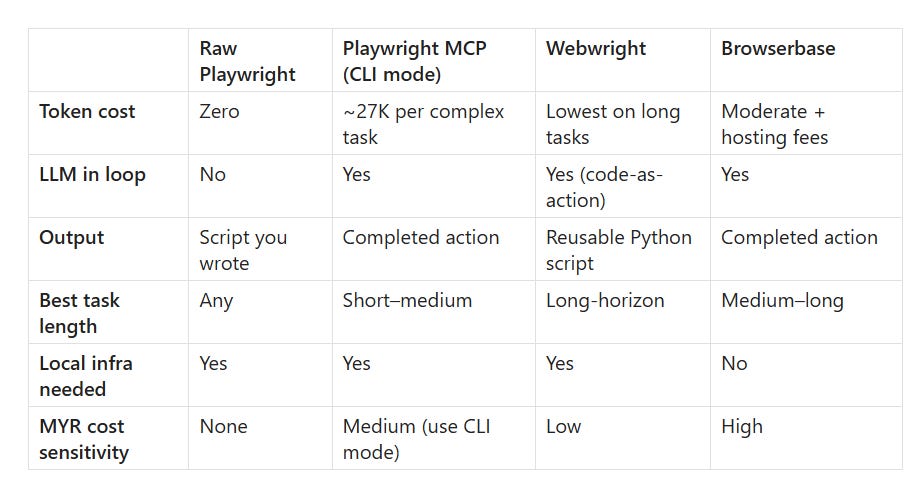
My Recommendation for Malaysian/SEA Devs
If you’re on OpenRouter or Anthropic API with a monthly budget under RM 500:
Start with raw Playwright if you know the target site well and the task is repetitive.
Use Playwright MCP in
@playwright/climode when you need Claude Code to drive the browser ad-hoc. Never default snapshot mode.Reach for Webwright when you’re building something that will run repeatedly and you want a script artifact, not just a one-off run.
Avoid Browserbase unless concurrency or stealth is a hard requirement — the per-task hosting cost adds up fast at SEA budgets.
The 4× token difference between Playwright MCP default vs CLI mode alone can save you serious money. Set it once, forget it.
Found this useful? Forward it to someone burning credits on Playwright MCP default mode. Subscribe for one practical AI/dev post per week, written from a Malaysian practitioner’s desk.
FAQ
Q: What is the cheapest browser automation option to use with Claude Code?
A: Raw Playwright — it has zero LLM token cost because there’s no model in the loop. If you need Claude Code to drive the browser, switch Playwright MCP to @playwright/cli mode to cut token usage roughly 4×.
Q: What is Webwright and how is it different from Playwright MCP?
A: Webwright is Microsoft Research’s terminal-native browser agent. Instead of one LLM call per click, it gives Claude a terminal to write and run full Playwright scripts — collapsing multi-step tasks into fewer LLM rounds and producing a reusable Python file at the end.
Q: How many tokens does Playwright MCP use per interaction?
A: In default snapshot mode, 5,000–15,000 tokens per interaction. In @playwright/cli mode, the same complex task measured ~27,000 tokens total vs ~114,000 in standard MCP mode — approximately a 4× reduction.
Q: When should I use Browserbase instead of Playwright MCP?
A: When you need concurrent cloud browser sessions, have aggressive bot-detection to deal with, or don’t want to manage local Chrome infrastructure. Note that Browserbase adds hosting costs (~$0.10–0.40 per task) on top of LLM token costs.
Q: Does Webwright work as a Claude Code plugin?
A: Yes. Webwright is designed to work as a Claude Code or Codex plugin. It sends task context to the model, receives bash/Playwright code back, executes it in a terminal, and compacts history every 20 steps to manage context size.
Q: What is the default snapshot mode in Playwright MCP and why is it expensive?
A: Default snapshot mode dumps the full accessibility tree of the current page directly into Claude’s context window on every interaction. This costs 5,000–15,000 tokens per snapshot and compounds across multi-step tasks. The @playwright/cli mode saves snapshots to disk instead, which eliminates this overhead.
Q: Which browser automation tool should a Malaysian developer on a limited budget choose?
A: Raw Playwright for known, repetitive tasks (zero cost). Playwright MCP in @playwright/cli mode for ad-hoc Claude Code tasks. Webwright for long-horizon tasks where you want a reusable script. Skip Browserbase unless concurrency or stealth is a hard requirement — the per-task hosting fees add up quickly at SEA budget levels.