
Why Webwright + Claude Code Cut My Testing Token Cost
I tested Microsoft Webwright with Claude Code on a WordPress plugin project—and discovered a surprising drop in testing token costs compared to Playwright.

3 June 2026, I tested Microsoft Webwright on my WordPress plugin project.
My stack:
✅ WordPress plugin (real-world, not demo)
✅ Claude Code
✅ Sonnet 4.6 Medium
And my honest reaction:
Webwright feels significantly smarter than Playwright — and surprisingly, it uses fewer tokens.
🧩 1. Context: Real Project, Real Friction
This wasn’t a toy example.
Plugin with UI interactions
Dynamic DOM elements
Usual WordPress quirks (admin panel, AJAX, inconsistent selectors)
With Playwright, I typically deal with:
fragile selectors
step-by-step scripting
repeated debugging cycles
😩 2. Where Playwright Starts Hurting (with Claude)
Using Playwright with Claude Code introduces hidden cost:
Prompt bloat
You paste long scripts
You include logs + errors
You explain what went wrong
👉 Result: high token usage per iteration
Debug loop
Fix selector
Re-run test
Fail again
Ask Claude again
👉 Tokens keep accumulating across cycles
Example reality
Instead of one clean prompt, you end up doing:
5–10 back-and-forth prompts
Each with growing context
🧠 3. What Feels Different with Webwright
Webwright flips the interaction model.
Instead of:
await page.locator(’#submit’).
You’re closer to:
Submit the form and verify success message
What I observed:
✅ Less need to inspect DOM manually
✅ Fewer explicit selectors
✅ Less “step-by-step micromanagement”
✅ Claude receives simpler instructions
The key shift:
Playwright → instruction-driven
Webwright → intent-driven
💸 4. Why Token Usage Drops (This Was Unexpected)
At first, I assumed:
“AI tool = more tokens”
But it turned out the opposite.
With Playwright:
Large code snippets in prompts
Full error logs
Detailed debugging explanations
👉 Claude needs to process everything
With Webwright:
You send shorter, higher-level instructions
Less need to include raw HTML or scripts
Fewer debugging iterations
👉 Claude processes less context overall
The real saving comes from this:
Not just shorter prompts
But fewer retries
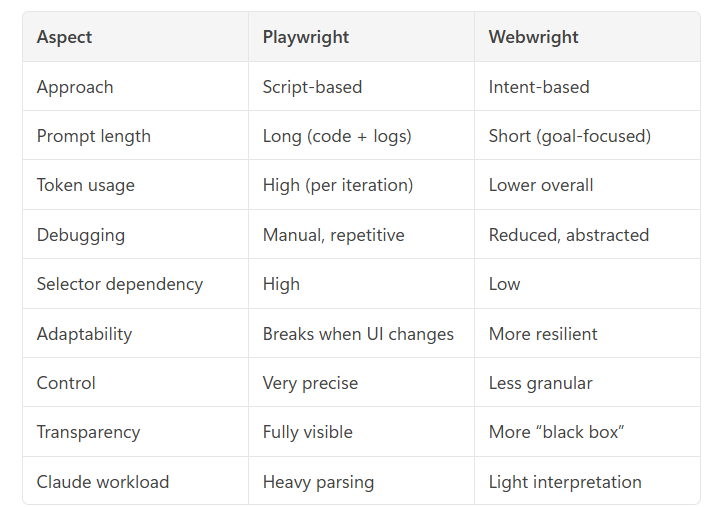
📊 5. Webwright vs Playwright (Practical Comparison)
⚖️ 6. Honest Trade-offs (Important)
Webwright is impressive—but not perfect.
⚠️ Less control
Hard to fine-tune exact steps
Not ideal for edge-case precision testing
⚠️ Black-box feeling
You don’t always know how it achieved the result
Debugging is less transparent
⚠️ Not fully replacing Playwright (yet)
Playwright still wins for:
CI pipelines
deterministic tests
enterprise stability
🧭 Final Take: This Is Bigger Than Testing
What I experienced is not just a better tool.
It’s a shift:
From automation scripts → automation intent
Old workflow:
Write script
Fix script
Maintain script
New workflow:
Describe goal
Let AI figure out execution
Intervene only when necessary
💡 My Personal Verdict
✅ For rapid testing + prototyping → Webwright wins
✅ For Claude Code workflows → huge token efficiency
✅ For WordPress plugin dev (messy UI) → very practical
But:
⚖️ Keep Playwright for production-grade pipelines
🔥 Closing Thought
The biggest surprise wasn’t that Webwright is smarter.
It’s this:
Smarter tools don’t just save time — they save tokens.
And if you’re working with Claude or any API-based workflow…
👉 That difference adds up fast.